# 
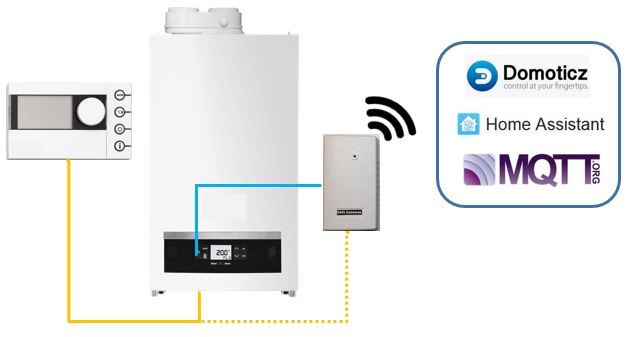
**EMS-ESP** is an open-source firmware for the Espressif ESP8266 and ESP32 microcontroller that communicates with **EMS** (Energy Management System) based equipment from manufacturers like Bosch, Buderus, Nefit, Junkers, Worcester and Sieger.
[](https://github.com/proddy/EMS-ESP/blob/master/CHANGELOG.md)
[](https://github.com/proddy/EMS-ESP/commits/master)
[](LICENSE)
[](https://travis-ci.com/proddy/EMS-ESP)
[](https://app.codacy.com/app/proddy/EMS-ESP?utm_source=github.com&utm_medium=referral&utm_content=proddy/EMS-ESP&utm_campaign=Badge_Grade_Settings)
[](https://github.com/proddy/EMS-ESP/releases)
[](http://isitmaintained.com/project/proddy/EMS-ESP "Average time to resolve an issue")
[](http://isitmaintained.com/project/proddy/EMS-ESP "Percentage of issues still open")
[](https://gitter.im/EMS-ESP/community)
If you like **EMS-ESP**, please give it a star, or fork it and contribute!
[](https://github.com/proddy/EMS-ESP/stargazers)
[](https://github.com/proddy/EMS-ESP/network)
[](https://www.paypal.com/paypalme/prderbyshire/2)
Note, EMS-ESP requires a small hardware circuit that can convert the EMS bus data to be read by the microcontroller. These can be purchased at https://bbqkees-electronics.nl/.
 ---
## **New Features in version 2**
- Support for both ESP8266 and ESP32 modules
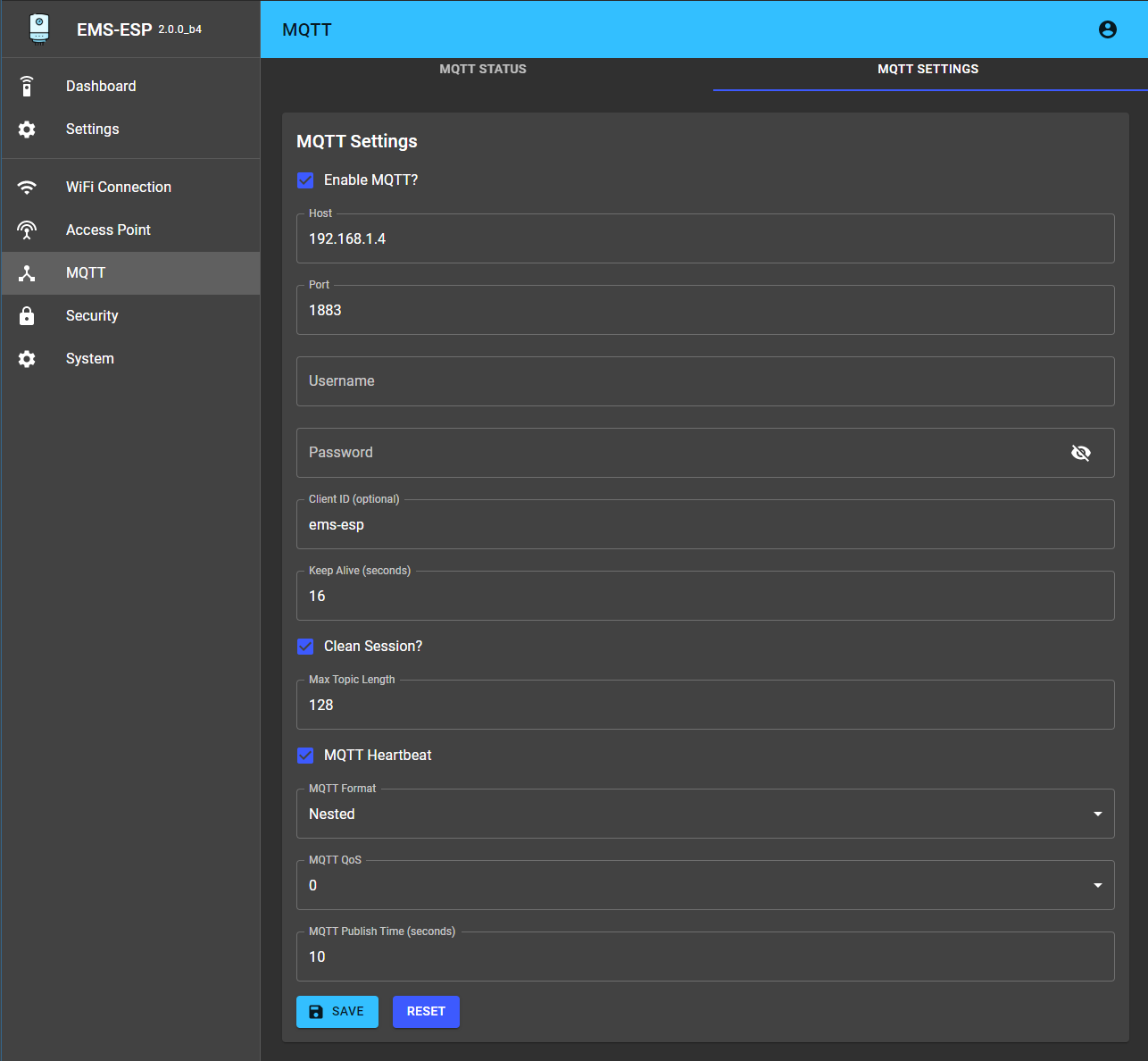
- A new multi-user Web interface (based on React/TypeScript)
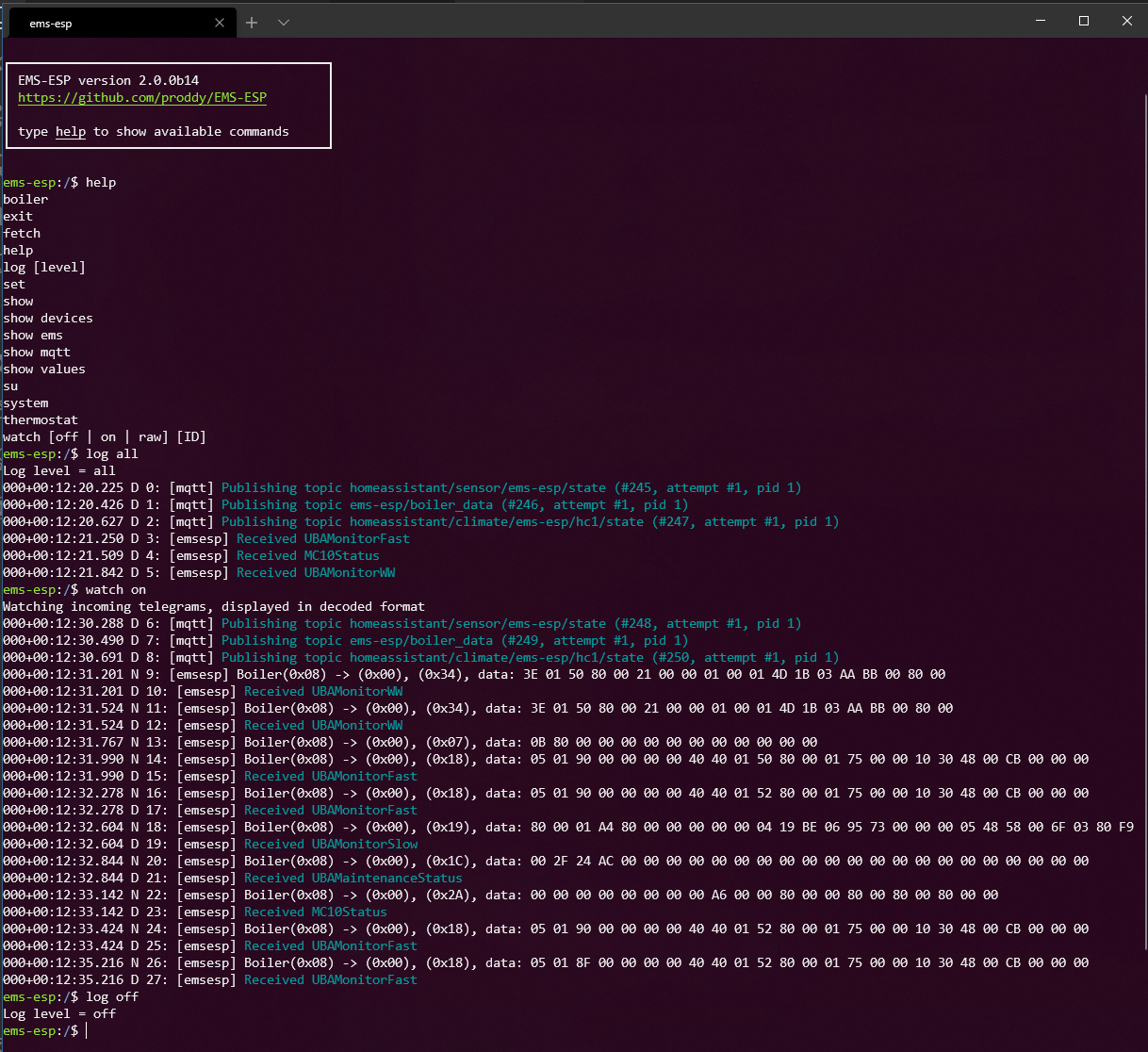
- A new Console, accessible via Serial and Telnet
- Tighter security in both Web and Console. Admin privileges required to access core settings and commands.
- Support for Home Assistant MQTT Discovery (https://www.home-assistant.io/docs/mqtt/discovery/)
- Can be run standalone as an independent Access Point or join an existing WiFi network
- Easier first-time configuration via a web Captive Portal
- Supporting over 70 EMS devices (boilers, thermostats, solar modules, mixing modules, heat pumps, gateways)
## **Screenshots**
| | |
| --- | --- |
|
---
## **New Features in version 2**
- Support for both ESP8266 and ESP32 modules
- A new multi-user Web interface (based on React/TypeScript)
- A new Console, accessible via Serial and Telnet
- Tighter security in both Web and Console. Admin privileges required to access core settings and commands.
- Support for Home Assistant MQTT Discovery (https://www.home-assistant.io/docs/mqtt/discovery/)
- Can be run standalone as an independent Access Point or join an existing WiFi network
- Easier first-time configuration via a web Captive Portal
- Supporting over 70 EMS devices (boilers, thermostats, solar modules, mixing modules, heat pumps, gateways)
## **Screenshots**
| | |
| --- | --- |
|  |
|  |
|
|
|  |
|  |
|
 ## **Migrating from versions 1.9**
EMS-ESP will attempt to automatically migrate the 1.9 settings.
Note there are some noticeable differences to be aware of in version 2:
### MQTT:
- MQTT base has been removed. All MQTT topics are prefixed with only the hostname, for example `ems-esp/status` as opposed to `home/ems-esp/status`.
- `heatPmp` renamed to `heatPump`
- `ServiceCodeNumber` renamed to `serviceCodeNumber`
- Firmware version has been moved to the `start` topic
- `desinfection` renamed to `disinfection`
### General:
- There is no "serial mode" anymore like with version 1.9. When the Wifi cannot connect to the SSID it will automatically enter a "safe" mode where the Serial console is activated (note Serial is always available on the ESP32 because it has multiple UARTs). The EMS-ESP's LED will blink fast when in Serial mode. When this happens connect via a USB using baud 115200.
If you run into issues try first erasing the ESP8266 with `esptool.py erase_flash` and uploading the new firmware manually. BBQKees has a good write-up at https://bbqkees-electronics.nl/wiki/gateway/firmware-update-to-v2.html.
## **Building the firmware using PlatformIO**
1. Install [PlatformIO](https://platformio.org/install) and [NodeJS](https://nodejs.org/en/).
2. Decide how you want to upload the firmware, via USB or OTA (Over The Air). OTA requires that a version of EMS-ESP is already running.
3. Create a new file called `pio_local.ini` and add these two lines for USB:
```yaml
upload_protocol = esptool
upload_port =
```
or these 2 for OTA:
```yaml
upload_protocol = espota
upload_flags =
--port=8266
--auth=ems-esp-neo
upload_port = ems-esp.local
```
3. type `pio run -t upload` to build and upload the firmware
## **Uploading the firmware**
Here we'll use the command-line. You'll need [Python]( https://www.python.org/downloads/) (version 3) installed and these 2 scripts:
- `esptool.py`. Install using `pip install esptool`.
- `espota.py` downloaded from https://github.com/esp8266/Arduino/blob/master/tools/espota.py
Both these tools are also in the repo in the `scripts` directory.
Next step is to fetch the latest firmware binary from https://github.com/proddy/EMS-ESP/releases, and if you're using USB with an ESP8266:
`esptool.py -p -b 921600 write_flash 0x00000 `
and for OTA:
`espota.py --debug --progress --port 8266 --auth ems-esp-neo -i -f `
## **Configuring EMS-ESP for the first time**
- After powering up the ESP, watch the onboard blue LED. A solid light means good connection and EMS data is coming in. A slow pulse means either the WiFi or the EMS bus is not connected yet. A very fast pulse is when the system is booting up and configuring itself which typically takes 5 seconds.
- Connect to the Access Point called `ems-esp` using the WPA password `ems-esp-neo`. When you see the captive portal sign-in with username `admin` and password `admin`. Set the WiFi credentials and go back to http://ems-esp. Remember to change the passwords!
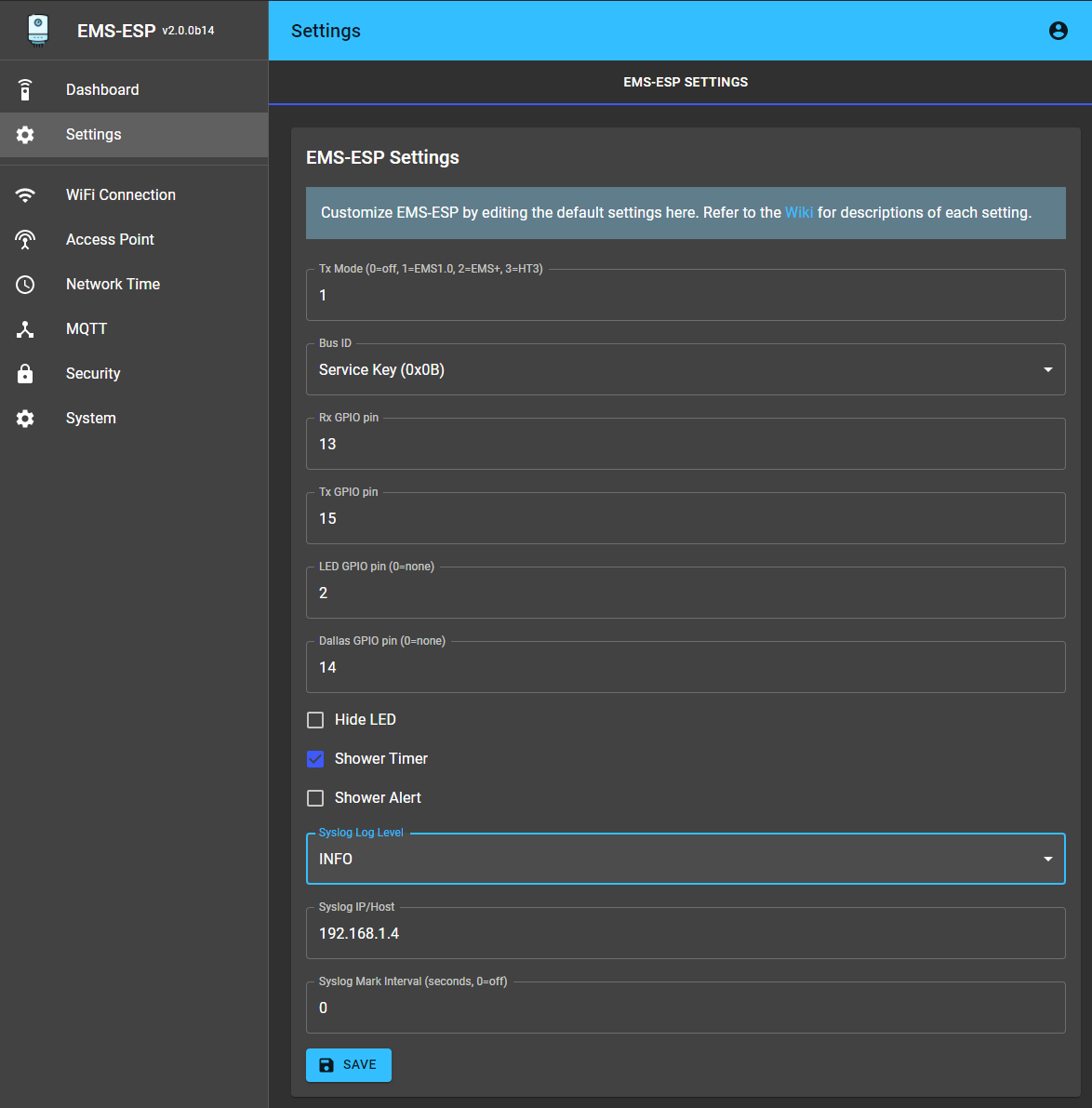
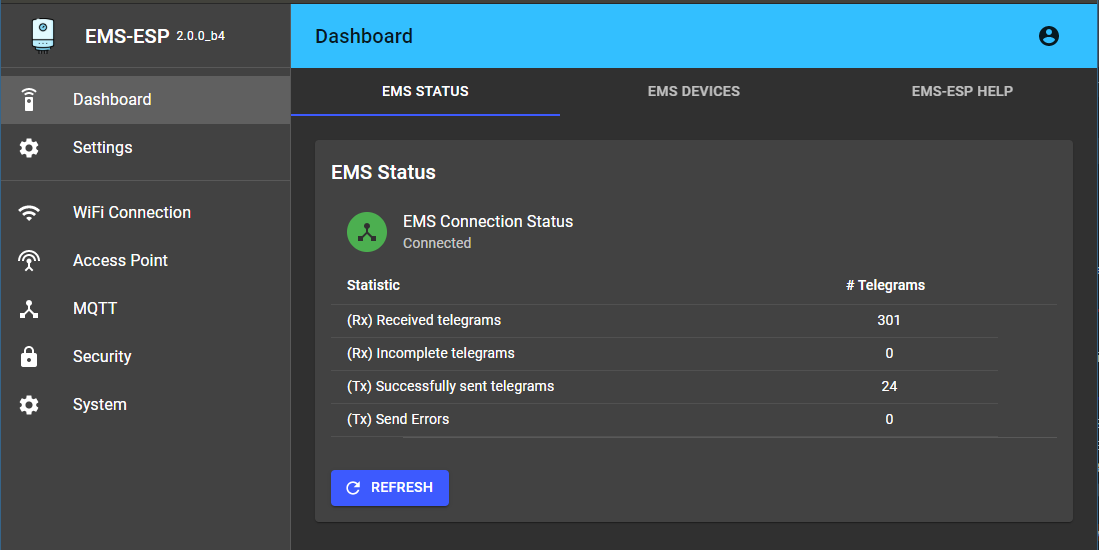
- First thing to check is if Tx is working and that you have a connection to the EMS bus. If Tx fails are shown in the Web interface try changing the Tx Mode from the settings page. There is no need to re-start the EMS-ESP.
- If Rx incomplete telegrams are reported in the Web interface, don't panic. Some telegrams can be missed and this is usually caused by noise interference on the line.
## **Using the Console**
Connecting to the console will give you more insight into the EMS bus traffic, MQTT queues and the full device information.
The console is reachable via Telnet (port 22) or via the Serial port if using an USB (on baud 115200). To change any settings in the console you must be admin (use `su` with the default password `ems-esp-neo`).
Some of the most common commands are:
* `help` lists the commands and keywords. This works in each context.
* `exit` will exit the console or exit the current context. `CTRL-D` does the same.
* `CTRL-U` for Undo
* `` for auto-complete
* Some specific commands are behind contexts. Think of this as a sub-menu. e.g. `system`, `thermostat`. The path will always show you which context you are in. `$` is the root.
* `su` will switch to the Admin super-user. The default password is `ems-esp-neo` and can be changed with `passwd` from the system menu or via the Web interface (called secret password). When in Admin mode the command prompt switches from `$` to `#`.
* Some settings can be changed in the console. The `set` command will list them.
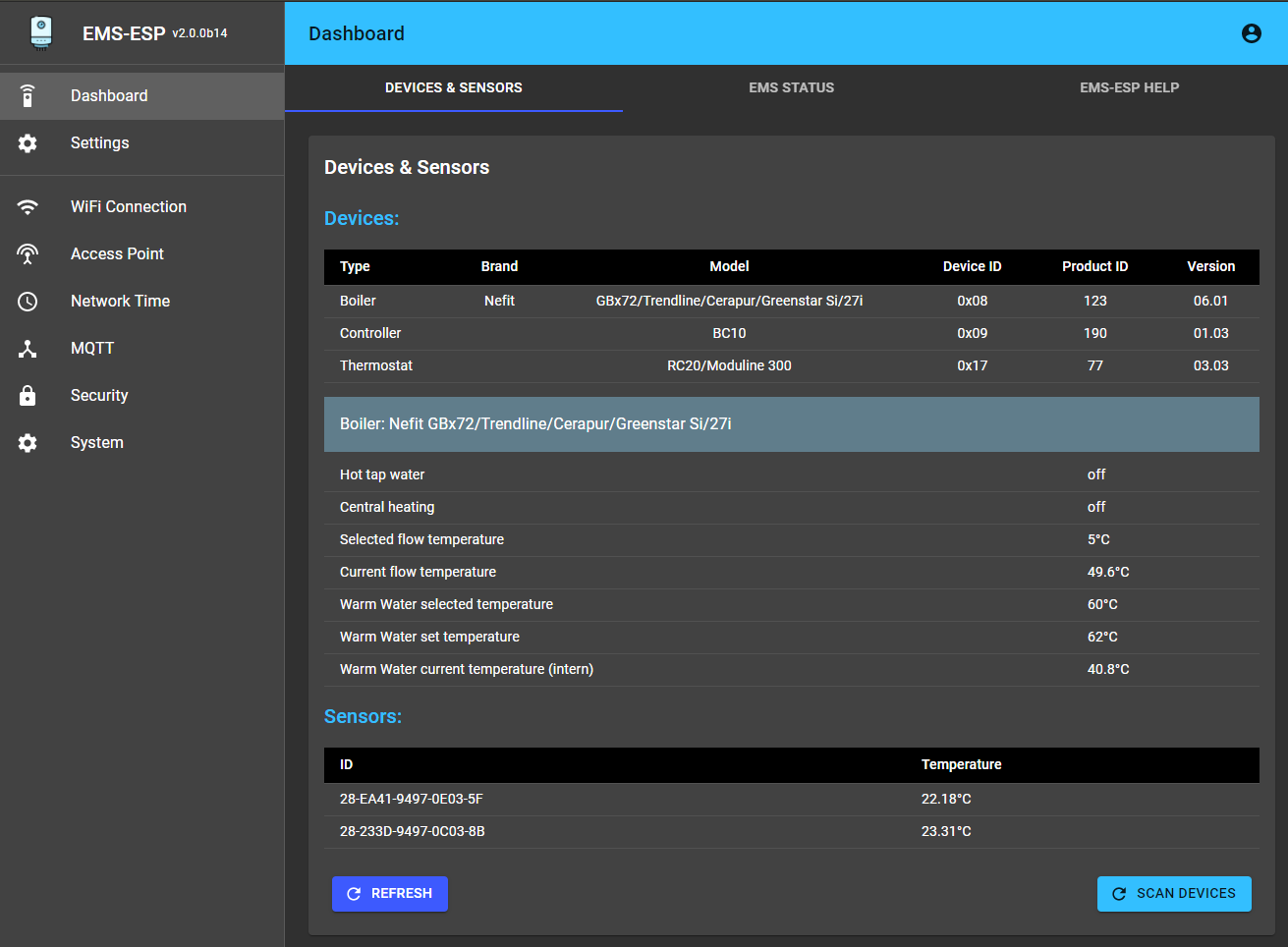
* `show` shows the data specific to the which context you're in. From the root it will show you all the EMS device information and any external temperature sensors.
* `log` sets the logging level. `log off` disables logging. Use `log debug` for debugging commands and actions. This will be reset next time the console is opened.
* `watch` will output the incoming Rx telegrams directly to the console. You can also put on a watch on a specific EMS device ID or telegram ID. Also choose to output as verbose text as raw data bytes.
The `call` command is to execute a command. The command names (`[cmd]`) are the same as the MQTT commands used in MQTT.
For further details refer to the [Wiki](https://bbqkees-electronics.nl/wiki/).
## **Support Information**
For a list of the EMS devices currently supported see BBQKees's [EMS device compatibility list](https://bbqkees-electronics.nl/ems-device-compatibility/).
If you're looking for support on **EMS-ESP** there are some options available:
### Documentation
* [Documentation Site](https://bbqkees-electronics.nl/wiki/): For information on how to build and upload the firmware maintained by @BBQKees
* [FAQ and Troubleshooting](https://bbqkees-electronics.nl/wiki/gateway/troubleshooting.html): For information on common problems and solutions
### Support's Community
* [EMS-ESP Support Chat](https://gitter.im/EMS-ESP/community#): For support, troubleshooting and general questions. You have better chances to get fast answers from members of the community
* [Search in Issues](https://github.com/proddy/EMS-ESP/issues): You might find an answer to your question by searching current or closed issues
### Developers' Community
* [Bug Report](https://github.com/proddy/EMS-ESP/issues/new?template=bug_report.md): For reporting Bugs
* [Feature Request](https://github.com/proddy/EMS-ESP/issues/new?template=feature_request.md): For requesting features/functions
* [Troubleshooting](https://github.com/proddy/EMS-ESP/issues/new?template=questions---troubleshooting.md): As a last resort, you can open new *Troubleshooting & Question* issue on GitHub if the solution could not be found using the other channels. Just remember: the more info you provide the more chances you'll have to get an accurate answer
## **Contribute**
You can contribute to EMS-ESP by
- providing Pull Requests (Features, Fixes, suggestions)
- testing new released features and report issues on your EMS equipment
- contributing missing [documentation](https://bbqkees-electronics.nl/wiki/) for features and devices
## **Credits**
A shout out to the people helping EMS-ESP get to where it is today
- @MichaelDvP for all his amazing contributions and patience. The core UART code is his.
- @BBQkees for his endless testing and building the awesome circuits
- @susisstrolch for writing a first working version of the EMS bridge circuit which I used to design EMS-ESP version 0.1
- Plus many more providing suggestions, PRs and Donations. Thanks!
## **License**
This program is licensed under GPL-3.0
## **Migrating from versions 1.9**
EMS-ESP will attempt to automatically migrate the 1.9 settings.
Note there are some noticeable differences to be aware of in version 2:
### MQTT:
- MQTT base has been removed. All MQTT topics are prefixed with only the hostname, for example `ems-esp/status` as opposed to `home/ems-esp/status`.
- `heatPmp` renamed to `heatPump`
- `ServiceCodeNumber` renamed to `serviceCodeNumber`
- Firmware version has been moved to the `start` topic
- `desinfection` renamed to `disinfection`
### General:
- There is no "serial mode" anymore like with version 1.9. When the Wifi cannot connect to the SSID it will automatically enter a "safe" mode where the Serial console is activated (note Serial is always available on the ESP32 because it has multiple UARTs). The EMS-ESP's LED will blink fast when in Serial mode. When this happens connect via a USB using baud 115200.
If you run into issues try first erasing the ESP8266 with `esptool.py erase_flash` and uploading the new firmware manually. BBQKees has a good write-up at https://bbqkees-electronics.nl/wiki/gateway/firmware-update-to-v2.html.
## **Building the firmware using PlatformIO**
1. Install [PlatformIO](https://platformio.org/install) and [NodeJS](https://nodejs.org/en/).
2. Decide how you want to upload the firmware, via USB or OTA (Over The Air). OTA requires that a version of EMS-ESP is already running.
3. Create a new file called `pio_local.ini` and add these two lines for USB:
```yaml
upload_protocol = esptool
upload_port =
```
or these 2 for OTA:
```yaml
upload_protocol = espota
upload_flags =
--port=8266
--auth=ems-esp-neo
upload_port = ems-esp.local
```
3. type `pio run -t upload` to build and upload the firmware
## **Uploading the firmware**
Here we'll use the command-line. You'll need [Python]( https://www.python.org/downloads/) (version 3) installed and these 2 scripts:
- `esptool.py`. Install using `pip install esptool`.
- `espota.py` downloaded from https://github.com/esp8266/Arduino/blob/master/tools/espota.py
Both these tools are also in the repo in the `scripts` directory.
Next step is to fetch the latest firmware binary from https://github.com/proddy/EMS-ESP/releases, and if you're using USB with an ESP8266:
`esptool.py -p -b 921600 write_flash 0x00000 `
and for OTA:
`espota.py --debug --progress --port 8266 --auth ems-esp-neo -i -f `
## **Configuring EMS-ESP for the first time**
- After powering up the ESP, watch the onboard blue LED. A solid light means good connection and EMS data is coming in. A slow pulse means either the WiFi or the EMS bus is not connected yet. A very fast pulse is when the system is booting up and configuring itself which typically takes 5 seconds.
- Connect to the Access Point called `ems-esp` using the WPA password `ems-esp-neo`. When you see the captive portal sign-in with username `admin` and password `admin`. Set the WiFi credentials and go back to http://ems-esp. Remember to change the passwords!
- First thing to check is if Tx is working and that you have a connection to the EMS bus. If Tx fails are shown in the Web interface try changing the Tx Mode from the settings page. There is no need to re-start the EMS-ESP.
- If Rx incomplete telegrams are reported in the Web interface, don't panic. Some telegrams can be missed and this is usually caused by noise interference on the line.
## **Using the Console**
Connecting to the console will give you more insight into the EMS bus traffic, MQTT queues and the full device information.
The console is reachable via Telnet (port 22) or via the Serial port if using an USB (on baud 115200). To change any settings in the console you must be admin (use `su` with the default password `ems-esp-neo`).
Some of the most common commands are:
* `help` lists the commands and keywords. This works in each context.
* `exit` will exit the console or exit the current context. `CTRL-D` does the same.
* `CTRL-U` for Undo
* `` for auto-complete
* Some specific commands are behind contexts. Think of this as a sub-menu. e.g. `system`, `thermostat`. The path will always show you which context you are in. `$` is the root.
* `su` will switch to the Admin super-user. The default password is `ems-esp-neo` and can be changed with `passwd` from the system menu or via the Web interface (called secret password). When in Admin mode the command prompt switches from `$` to `#`.
* Some settings can be changed in the console. The `set` command will list them.
* `show` shows the data specific to the which context you're in. From the root it will show you all the EMS device information and any external temperature sensors.
* `log` sets the logging level. `log off` disables logging. Use `log debug` for debugging commands and actions. This will be reset next time the console is opened.
* `watch` will output the incoming Rx telegrams directly to the console. You can also put on a watch on a specific EMS device ID or telegram ID. Also choose to output as verbose text as raw data bytes.
The `call` command is to execute a command. The command names (`[cmd]`) are the same as the MQTT commands used in MQTT.
For further details refer to the [Wiki](https://bbqkees-electronics.nl/wiki/).
## **Support Information**
For a list of the EMS devices currently supported see BBQKees's [EMS device compatibility list](https://bbqkees-electronics.nl/ems-device-compatibility/).
If you're looking for support on **EMS-ESP** there are some options available:
### Documentation
* [Documentation Site](https://bbqkees-electronics.nl/wiki/): For information on how to build and upload the firmware maintained by @BBQKees
* [FAQ and Troubleshooting](https://bbqkees-electronics.nl/wiki/gateway/troubleshooting.html): For information on common problems and solutions
### Support's Community
* [EMS-ESP Support Chat](https://gitter.im/EMS-ESP/community#): For support, troubleshooting and general questions. You have better chances to get fast answers from members of the community
* [Search in Issues](https://github.com/proddy/EMS-ESP/issues): You might find an answer to your question by searching current or closed issues
### Developers' Community
* [Bug Report](https://github.com/proddy/EMS-ESP/issues/new?template=bug_report.md): For reporting Bugs
* [Feature Request](https://github.com/proddy/EMS-ESP/issues/new?template=feature_request.md): For requesting features/functions
* [Troubleshooting](https://github.com/proddy/EMS-ESP/issues/new?template=questions---troubleshooting.md): As a last resort, you can open new *Troubleshooting & Question* issue on GitHub if the solution could not be found using the other channels. Just remember: the more info you provide the more chances you'll have to get an accurate answer
## **Contribute**
You can contribute to EMS-ESP by
- providing Pull Requests (Features, Fixes, suggestions)
- testing new released features and report issues on your EMS equipment
- contributing missing [documentation](https://bbqkees-electronics.nl/wiki/) for features and devices
## **Credits**
A shout out to the people helping EMS-ESP get to where it is today
- @MichaelDvP for all his amazing contributions and patience. The core UART code is his.
- @BBQkees for his endless testing and building the awesome circuits
- @susisstrolch for writing a first working version of the EMS bridge circuit which I used to design EMS-ESP version 0.1
- Plus many more providing suggestions, PRs and Donations. Thanks!
## **License**
This program is licensed under GPL-3.0